
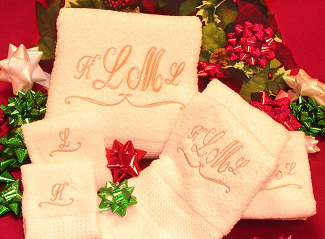
 This is the How To Create Beautiful Large & Small Monograms Members Only Home Page. Below you will see that it is divided into 2 Modules. I teach you how to create monograms using the embroidery fonts that are built into your system in Module 1. In Module 2, I also teach you how to create monograms using true type fonts.
Make sure that you follow all of the lessons in order the first time that you go through the program. Each lesson should be done in the order that I have them laid out on the page. It is to your benefit that you do not skip around.
After you go through all of the videos in the first section, go back and watch them again and then do the Homework for that Lesson. Do not move onto the next section until you have all of the Homework completed from the previous section.
 To watch the videos in full-screen mode, click on the “Enter Full Screen” icon on the right bottom corner of the video.


In Module 1, I am going to be showing you how to create beautiful large and small monograms with your standard embroidery fonts. This will work for any type of embroidery program as long as you have editing capabilities within your software.
Video: Monogram Basics
In the video, I show you the Monogram Basics. Monograms can be created in 1, 2, 3 and even 4 letters depending on the customers name and configuration of their name. I also talk about the Popular layouts for Monogram Etiquette and have included a written article for you to print and refer to.
Article: Monogram Etiquette
Video: Creating A Monogram
In Module 1, I will show you how to create beautiful large and small monograms with your standard embroidery fonts. This will work for any type of embroidery program as long as you have editing capabilities within your software.
Video: Creating A Circle Monogram
In this video, I show you how to create a Circle monogram using a font from the software. I then show you how to edit it and create an entire set of monograms from this font. This technique will apply to any monogram font that you have in your embroidery software.
Video: Small Monogram Tips
In this video, I give you several tips to use when you are creating small monograms for dress shirts or handkerchiefs. It is very important to remember what the best sizes are and the best colors to use, especially, if you are creating monograms for men’s dress shirts.
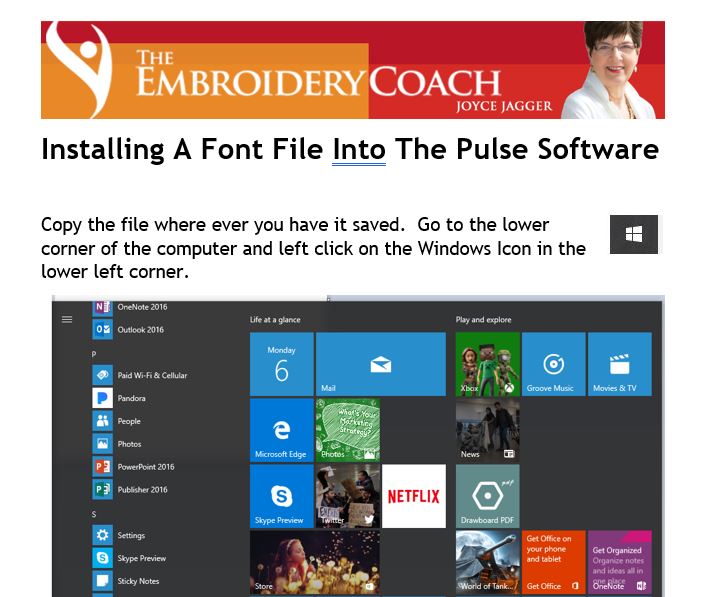
Article: Installing Fonts Into Pulse Embroidery Software
In this article, I show you how to install fonts into the Tajima by Pulse Embroidery Software. If you have the Pulse software, you can install the Medieval font directly into your program and you will be able to use the Medieval font, like any other font file, to create your monograms.
Link to Article: Installing A Font File Into The Pulse Software
Video: Creating Monograms With The Medieval Font
In this video, I show you how to create monograms using the Medieval font that I digitized for you. I show you how to create single letter monograms, 2 letter monograms, and 3 letter monograms.
I no longer have a DVD available. The font files are included on this page.
Medieval Monogram Font Files
These are the Medieval Monogram font files that I digitized for you. I have given them to you with 4 different extensions depending on what type of embroidery program you have.
Tajima by Pulse Medieval Monogram Font File
This Tajima by Pulse Monogram font file (fon) can be installed directly into the Pulse program. You can click on the Installation Guide PDF to see how to do this. If you do not have the Tajima by Pulse Embroidery Software, you will not be able to download the .fon extension file and install it. I give you directions as to how you can use it in the .dst files.
Link to Download the Font Installation Instructions:Font Installation
Link to Medieval Font: DesignFiles/Medieval.fon
Medieval Monogram .PXF Font Files
These are the individual PXF font files for the Medieval font. Click on each link to download the zipped file of individual letters. After the file is unzipped you will have access to all 3 versions of each letter in the alphabet. There is a small letter on the left, a large letter in the center, and another small letter on the right. Save them in a file inside of your monogram program. This is for the person that does not want to install the font file inside of the Tajima by Pulse Embroidery Program.
These .pxf files will work in Tajima by Pulse software versions 10 and up only. This is a long file name. If it breaks, copy and paste it into your browser and it should work.
Medieval Monogram .POF Font Files
These are the individual POF font files in a Zip file for the Medieval font. Click on each link to download the zipped file of the individual letters. Each link will have all 3 versions of the letter in it. There is a small letter on the left, a large letter in the center, and another small letter on the right. Save them in a file inside of your monogram program.
These .pof files will work in Tajima by Pulse software versions 9 and up only. This is a long file name. If it breaks, copy and paste it into your browser. It should work.
Medieval Monogram .DST Font Files
These are the individual DST font files for the Medieval font. Click on each link to download the individual letters. Each link will have all 3 versions of the letter in it. There is a small letter on the left, a large letter in the center, and another small letter on the right. Save them in a file inside of your monogram program. The small letters are 1 inch and the center letter is 2 inches.
These .dst files will work with most embroidery programs.

In this Module, I show you how to edit a true type font and create a monogram font from it. I also show you how to create sets of monograms from your fonts. These sets go from Washcloth or Handkerchief size to Shower Curtain or Duvet Cover size. This is very important if you want to create custom monograms for high end customers or Interior Designers.
Video: The Basics of Working With True Type Fonts
In this video, I show you how to begin working with True Type Fonts. I no longer have the dvd that is mentioned in the video. Instead, I have included those files in a link below for you to download.
Link to True Type Fonts: DesignFiles/English-script.zip
Video: Editing True Type Fonts
In this video, I show you how to open and edit a true type font so that it will work for a monogram.
Video: Creating A True Type Font Monogram
In this video, I show you how to create a monogram using the Sheet Elegance True Type Font that I just edited.
Video: Creating A Full Set Of Monograms with a True Type Font
In this video, I show you how to create the full set of monograms from the True Type Font monogram we just created in the last video. This technique is something that not everyone will do and is a real seller for high end clientele and Interior Designers.
Video: Closing Remarks About Monograms
In this video, I talk about the difference between running a large monogram that has been edited properly and running a monogram that has just been enlarged and had the stitch pattern changed. You are looking at a running time for the enlarged monogram of over 2.5 times as long and this is very costly.
Designs: Borders To Add To Monograms
These are Borders that can be added to your monograms to give them an entirely different look. I have also added these borders under script sayings, names, and dates. They make a great addition and it gives your design more of a custom look that other embroiderers do not offer. These are borders that I have created and used myself on many occasions! I hope you enjoy them!
I am also offering them in 3 different file formats. One of these formats will work in your embroidery software.
If the file breaks when you are trying to download it, copy and paste the link in your browser and that should work.
PXF file format:Borders-.pxf-files.zip
POF file format: Borders-.pof-files.zip
DST file format:Border-.dst-files.zip
Font Files: True Type Font Files
These 2 fonts, Sheer Elegance and Vivaldi, are my favorite true type fonts and I use them regularly! These are excellent fonts and you will be able to create a lot of different monograms with them. They are especially great for wedding presents. These two true type fonts are zipped together in one file. When you download and unzip the file you can install each one into your Font file in Windows.